

node skills/code-drawn-items-and-gear/item-forge.mjs --demo out 
Countless items from a few parts
One sword through every rarity frame, from the item generator.
In the kitDraft
The MindQuest builder kit
Coming soon, in one folder: the skills (SKILL.md), Claude Code workflows, prompts and code we build MindQuest with.
Almost there
We'll email a link to . Press it within 7 days of getting it, and you're on the list.
It usually comes in a minute. When we're very busy, it can take a few days. Already on the list? Then no new email comes.
Got it. We'll email the link.
 Back soonThe list is paused for a moment. Please come back soon.
skills/code-drawn-pixel-sprites/SKILL.mdTestedDraw creatures, NPCs, props and icons as string grids in code that sit beside existing pixel art and pass a 1x craft audit; baked rotations; distinctness, contrast and clip-data checks. Tools: grid-sprite.mjs, bake-rotations.mjs, sprite-checks.mjs, measure-sprite.py.
In the kit
Each skill is a SKILL.md file: the steps, the numbers that worked, and the mistakes we made first. Your Claude reads it before it starts the job.
---
name: find-a-visual-style-with-the-owner
description: Use when an owner wants you to take over or invent the look of a game world (or any large visual system) and the style is not settled yet, especially after they reject your first attempts or compare you to AI-generated or bought art. A tested loop of measure, tiny swatches, a few pointed questions, media marriages and a locked pick that went from "take it over" to a style the owner loved in about two hours.
---
This is what your Claude reads.
---
name: measure-reference-art
description: Use before trying to match, beat or replace a piece of reference art (an AI-generated map, a tileset, a competitor's screenshot, the owner's favourite image), and whenever the owner says your art is "far away" from a reference. Measures what KIND of image the reference really is (true pixel art at some scale, a hi-colour painting in a pixel style, flat vector) so you pick a medium that can actually reach it, or say honestly that it cannot.
---
This is what your Claude reads.
---
name: pixel-grain-storybook-world
description: Use when a game wants a soft, painted (watercolour / storybook) world AND crisp pixel-art characters, props and UI, and the two must feel like one world instead of pixel stickers on a painting. Also when the world must be generated from code at runtime (tiny downloads) and react to gameplay through cheap palette remaps. Covers the painting, the grain, the shared palette, sprite remapping, shadows and the engine rules.
---
A watercolour painted by code, then quantised to a pixel grain on ONE palette that the pixel sprites also use. The painting keeps its washes, glazes and ink; the grain and the shared ramps make it the same material as the sprites. Every shadow, light and world reaction afterwards is a palette remap of an index image, so the painting reacts "in its own medium" and runtime costs stay tiny.
This is what your Claude reads.
---
name: world-reactions-big-then-heal
description: Use when a game world should visibly react to attacks, skills and players (burnt grass, shockwaves bending grass and shaking trees, ripples, fire light) and then recover, especially on a palette-indexed or pixel-art ground where reactions must be cheap, deterministic and identical on every client. Gives the architecture (mask field + palette remap + time thresholds), tested timings, and the pitfalls.
---
Our owner's rule: the environment must react to attacks and skills (his examples: burned grass, trees hit by shockwaves), because feel and feedback can beat raw prettiness. Asked how strong, he picked "big, then heal": a reaction lands loud and clear, then the world recovers over seconds to minutes. A world that remembers for a while feels alive; a world that never heals becomes a mess in a busy multiplayer zone.
This is what your Claude reads.
---
name: code-drawn-pixel-sprites
description: Use when you must draw pixel-art creatures, NPCs, props, pickups or icons in code (string grids, no image generation, no copied pack pixels) and have them sit beside existing pixel art, animate in stepped frames, and pass a measurable craft audit at 1x.
---
How we drew about 28 enemies, a mascot NPC, trees, ore rocks, bushes, pickups, UI icons and bosses entirely in code, so they sit next to a commercial 16 px top-down pack without looking foreign. The art is written as string grids and small hand-placed geometry, composed from parts, outlined once, cleaned, measured, and LOOKED at on every ground at 1x and zoomed.
This is what your Claude reads.
---
name: code-drawn-items-and-gear
description: Use when a game needs many items, weapons and wearable equipment (inventory icons, world drops, gear drawn on the character in every animation frame) and you want a deterministic code generator instead of image generation. Covers the item record, part libraries with anchors, materials, rarity, names, curation, worn-layer anchors with a coverage audit, and the review gates, with a runnable one-family generator (item-forge.mjs).
---
Our owner asked for "countless" items, weapons and equipment after judging the image-generated gear not good enough. In our experience, image-generated props did not share the characters' pixel density (we measured props at 2 texels per world unit with thousands of colours, beside 1-texel characters), and a still image gives no consistent frames for every animation of the character. This skill is the method we adopted: every item is a small DATA record, and code draws all of its pictures from that record, in the same pixel language as the characters (see code-drawn-pixel-sprites).
This is what your Claude reads.
---
name: npc-and-mascot-design
description: Use when designing a friendly NPC or a brand mascot for a pixel game, both as a small in-world sprite and as a dialogue portrait: size and silhouette rules, big-eyes chibi rules and where they do NOT apply, expression patches, blinks and talking mouths, identity lock across a portrait set, and how to request portrait art from another pipeline as a spec.
---
Our core NPC is the brand mascot: a small lion with a big periwinkle mane, huge round glasses and a white doctor's coat. The owner wanted him "super cute" with big chibi anime eyes. The first in-world sprite came back with one note: cute, "but the eyes are huge, that's the only issue". That note is the heart of this skill: a mascot lives at two scales, and the rules differ.
This is what your Claude reads.
---
name: minigames-as-learning
description: Use when designing educational mini games where the game itself must teach (not a quiz in costume), especially at scale (hundreds of concepts): objectives from reviewed sources, misconceptions that fail visibly in the world, three competing pitches, a weighted judge, a uniqueness registry that refuses look-alike games, and a learning playtest with pre/post gain.
---
Our owner's product rule, in our words: the mini games are the educational experience itself. A player can learn a whole chapter inside one game; characters explain the material step by step and the player has to DO things that only work if they understood. And a binding second rule: every mini game is a unique game of its own, not the same vibe re-skinned, built slowly concept by concept until thousands of concepts are covered.
This is what your Claude reads.
---
name: review-your-own-renders
description: Use whenever an agent produces images, sprite sheets, animation reels, UI stills or HTML previews, before calling the work done or showing a human. Says what to look at and in which order (contact sheet, key frames, zoomed crops, every ground, every clip), what to measure instead of eyeballing, and how to render long sequences in slices with a memory guard so a leak cannot take the machine down.
---
The rule we hold every agent to: never report, and never show the owner, anything you did not look at yourself. An agent that writes "rendered showcase.mp4" without opening a frame of it has not finished. Tests passing is not the same as the picture being right, and neither is the owner's acceptance: record those three separately.
This is what your Claude reads.
---
name: design-in-lab-then-port
description: Use when building any new UI surface, visual system or effect for a real product (a game window, HUD piece, menu, cutscene moment, web page, a world art style). Design it first in a separate lab against the real data contracts, get the owner's explicit OK on stills and motion, then port it into the product yourself behind a flag, with a measured live-versus-design fidelity loop and an integration gate. Do not hand the design to another agent to re-implement.
---
The two failure modes this prevents: 1. Designing in the product. Every experiment touches shared code, other agents collide with you, the owner sees half-built screens in the real app, and a bad idea costs a revert. 2. Handing a finished design to someone else to rebuild. In our project the other AI agent re-implemented the lab designs inside the game. The owner's verdict: it "failed to do so nicely, it looks really bad". From then on the designer implements, and the other agent only wires data. The owner's later rule was even shorter: the real game must feel like the demos.
This is what your Claude reads.
---
name: critic-panel-improve-loop
description: Use when a visual or game-feel result (renders, clips, UI screenshots, a web page) must reach a very high owner bar ("stunning, really polished") and you want agents to raise it without losing what the owner already liked. A panel of independent strict critics with different lenses, one improver that merges their fixes, a fresh panel re-judging every round, and a before/after gate against a frozen copy of what the owner saw.
---
One agent reviewing its own work says "looks great". One critic reviewing another agent's work usually finds real problems, but it sees through one lens and it can be talked out of them by the next report. What worked for us is a small panel of strict critics, each with a named lens and an anchored scale, judging files they must actually LOOK at, and a single improver per round who merges their fixes. Every round is re-judged by fresh critics who are told to verify the improver's claims, not trust them. A final gate compares the result with a frozen copy of the version the owner saw, so polish never destroys what he liked.
This is what your Claude reads.
---
name: build-critic-fix-pack
description: Use when agents must build several independent pieces of real code (features, packages, lanes) and each piece should be attacked by an independent critic, fixed, checked and packaged into an exact commit set before a human or lead commits it. Runs one pipeline per piece with no barriers between stages, and keeps each run resumable.
---
The chain we used for every piece of game code that agents wrote: a builder implements it, an adversarial critic that assumes mistakes attacks the real diff, a fixer closes what the critic proved, and a gate (the "pack" step) re-runs the checks and returns the exact commit set, the commit message and the change-log entries. Agents never run git; the lead commits the exact paths afterwards.
This is what your Claude reads.
---
name: parallel-lanes-with-gates
description: Use when several agents must change one codebase at the same time on one machine: split the work into lanes that own disjoint files, route every heavy check through one shared lock, hold shared files in one lane per wave, then run an integration gate and commit each lane with its exact paths. Also answers "can we just run 45 lanes in parallel?"
---
How we ran several builder agents in one worktree without them overwriting each other, without melting a 32 GB laptop, and without committing someone else's work.
This is what your Claude reads.
---
name: workflow-resume-and-continuation
description: Use when a multi-agent Claude Code Workflow run stopped before it finished (usage limit, closed session, account switch, crash) and you must finish it without redoing finished agents, or before launching long runs so they survive a stop. Covers journals, label-cached continuation scripts, the RESUME note, run registries, and why you never message a running workflow agent.
---
This is what your Claude reads.
---
name: multi-account-handover
description: Use when one long project is worked on by many AI sessions that can stop at any moment (usage limits, several accounts, laptop plus cloud sessions, a second AI agent in the same repo). Keeps one START HERE handover, a sign-in log and a run registry, plus a resume recipe, so a fresh session with no memory continues exactly where the last one stopped without redoing finished work or colliding with a live run. Triggers - "switch accounts", "continue where the last session stopped", "we hit the usage limit", "handover", or reaching about 90% of your usage.
---
A long build with AI agents is not one conversation. It is a relay: sessions hit usage limits, the owner switches accounts, a cloud session runs while the laptop is off, another AI works in the same repo. Background multi-agent workflows die with the session that launched them. Everything the next runner needs must be on disk, in a few fixed files, current to the minute.
This is what your Claude reads.
---
name: owner-feedback-log
description: Use whenever the human owner reacts to your work or makes a decision (a verdict on a render, a new rule, a change of direction, answers to your questions, "stop", "go"). Log the words verbatim with the time and exactly what they saw, write what it means and what you did, and turn binding decisions into durable rules that every future session and agent will obey.
---
When one person steers many AI sessions, the owner's words are the spec. Paraphrase loses the signal: "cute but not quite" and "very ugly, you are so far away" are both "not approved", but they call for very different next moves. Sessions on other accounts were not in the chat. The log is how they hear the owner.
This is what your Claude reads.
---
name: owner-updates-by-showing
description: Use whenever you report to a busy, non-developer owner while agents work in the background. Message only when there is something to see or try, send stills and short clips sized for a phone, give honest scores and honest limits, ask only real decisions (few, with defaults), and otherwise work silently without previews or windows on the owner's machine.
---
Our owner is not a developer, reads on his phone, and shares his computer with two AI agents and his own work. What he wants from an update: what can I look at, is it good, what do you need from me. Everything else is noise, and live previews make his machine lag.
This is what your Claude reads.
---
name: build-in-public-cadence
description: Use when the owner builds the product in public on social media (X/Twitter, Instagram, TikTok) and wants a steady flow of short progress videos. Offer a clip with every visual milestone, make it in a fixed format (hook, captions, before/after, crisp pixels, credit card) with post copy in the owner's voice, and hand it over; the owner posts, the agent never does.
---
Our owner posts 3-5 updates a day while building the game in public. His rule to the agents (it changed twice in one night before it settled, which is a lesson in itself: write the rule down each time and date it): make a video only after asking "should we make a video of this?" and getting a yes. The agents make it; he posts it. Between videos, keep sending crisp, shareable stills and clips, because he uses them for his own posts.
This is what your Claude reads.
---
name: keep-a-builder-kit
description: Use at every milestone of a long AI-assisted build to capture what worked as a reusable, sellable kit - Claude Code skills (SKILL.md), generalised workflow scripts, prompts, templates and dated lessons - written so another team's Claude or Codex can apply them without access to your machine. Also use when adding, promoting or auditing anything in the kit.
---
Every hard-won method in a long build (how we found an art style with the owner, how five accounts shared one project, how critics were kept strict) is a product in its own right. Written down while fresh, it costs minutes; reconstructed months later, it is gone. Our owner put it as a standing rule: keep a growing archive of skills, workflows and prompts, polish it over time, sell it later, so other teams' agents can learn from it.
This is what your Claude reads.
Panel, 2-3 improve rounds each re-judged, a before/after check, an owner pack. 13-17 agents.
This is what your Claude reads.
A build wave: lanes as args, one pipeline per lane, shared-file follow-up, integration gate, docs step. 10-12 agents for two lanes.
This is what your Claude reads.
The same tiny scene drawn in N styles, a curator, an optional critic that stars a pick, a labelled phone sheet with steering questions. 10-12 agents.
This is what your Claude reads.
Parallel studies, one design doc, an optional stop for the owner's answers, a shared core built first, prototype parts with named outputs, lenses plus an adversary, fix rounds routed to parts, shared code or the design, a pack and a handoff brief. 4 agents to the stop; 12-28 for a full run (2 parts). Example args: a code-drawn item generator.
This is what your Claude reads.
Two no-context testers follow only your handover in a dry run, report gaps with file:line, a fixer limited to allowed files, an optional retest.
This is what your Claude reads.
Seed or refresh a kit like this one: harvesters by area, an assembler, a safety scan plus a cold-reader test, a fix pass.
This is what your Claude reads.
Tested: used in our real work, and it held. Draft: it worked once, or its code has only run on its own demo. Every file says which, with the evidence.
The kit grows with every milestone, and each release lists what changed.
Drawn in code
Every creature here is a grid of code, drawn with Claude using the kit's methods. Hover or tap one to see it move and learn its name.
Made with the kit's methods22 creatures, 6 elites and a boss from the MindQuest lab.
These creatures are MindQuest's own. The kit teaches the methods that drew them, with the scripts to draw your own.
Run it yourself
The kit's art tools run on Node, with no packages to install. These are their own demo outputs, exactly as the commands draw them.
node skills/code-drawn-items-and-gear/item-forge.mjs --demo out One sword through every rarity frame, from the item generator.
In the kitDraft
node skills/pixel-grain-storybook-world/pixel-grain-core.mjs --demo out 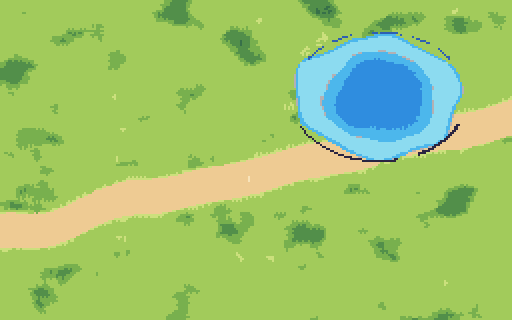
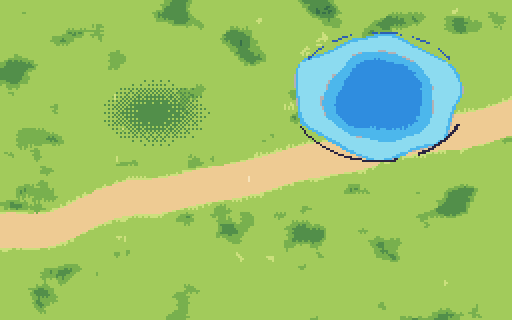
A watercolor meadow quantized to pixel cells, and the same patch with its shadow remap.
In the kitTested
Built in public
The kit keeps a dated log of our real work, mistakes included. A few lines from it:
Join the list, and we'll email you when the MindQuest builder kit is ready.
Claude is made by Anthropic. MindQuest is not affiliated with Anthropic.